Dreamweaver网站注册步骤jquery流程导航代码分享
Dreamweaver是一款很多从事网页设计的网友都在使用的一款工具,它能够制作出很多网页特效功能,但是有些特效还是需要网友手动添加代码才可以的,就像这里为大家提供的DW网站注册步骤动态导航代码一样,大家可以将这个代码直接复制黏贴到Dreamweaver中使用,也可以自行调用。jquery流程导航代码适用浏览器:IE8、360、FireFox、Chrome、Safari、Opera、傲游、搜狗、世界之窗.
Dreamweaver制作步骤流程导航
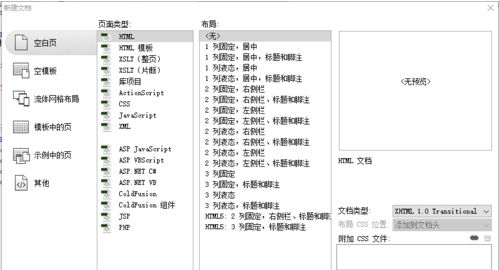
打开Adobe Dreamweaver cs5新建一个空白网页
切换到代码页面
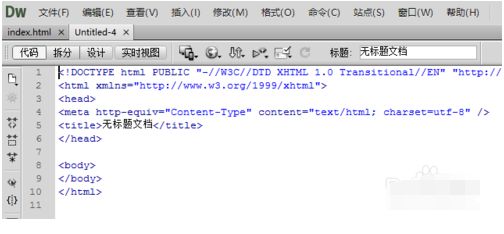
把以上的代码删除,粘贴一下的代码:

在之间插入图下中的代码:
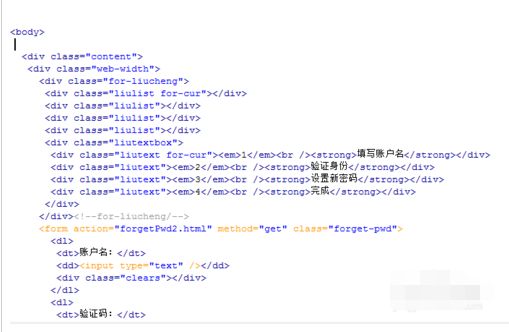
继续插入
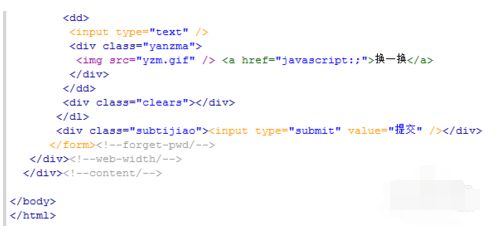
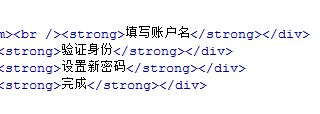
如果要修改步骤的名称就在这里修改
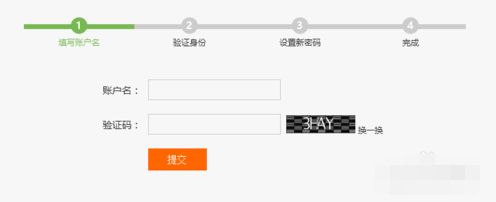
编辑好的效果图
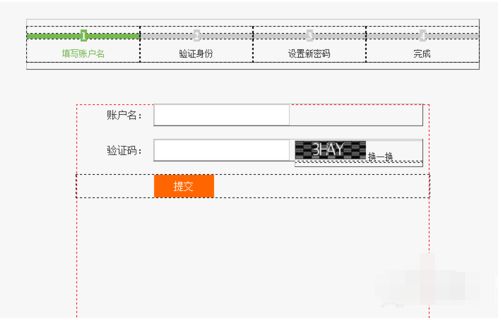
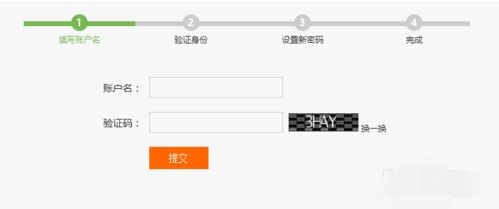
DW网站注册步骤动态导航代码分享:jQuery滑动分步式进度导航条代码
@charset "utf-8";
*{padding:0;margin:0;}
.ui-stepBar-wrap{position:relative;width:100%;height:130px;background:#ebeef3;overflow:hidden;display:none;z-index:100;}
.ui-stepBar-wrap .ui-stepBar{position:relative;width:90%;height:5px;background:#cccccc;top:50px;left:5%;z-index:101;}
.ui-stepBar-wrap .ui-stepBar .ui-stepProcess{position:relative;width:0;height:5px;background:#516784;top:0;left:0;z-index:102;}
.ui-stepBar-wrap .ui-stepInfo-wrap{width:90%;margin:0 auto;height:100%;}
.ui-stepBar-wrap .ui-stepInfo-wrap .ui-stepInfo{position:relative;float:left;padding-top:36px;text-align:center;}
.ui-stepBar-wrap .ui-stepInfo-wrap .ui-stepInfo .ui-stepSequence{position:relative;padding:4px 8px;border-radius:50%;z-index:103;}
.ui-stepBar-wrap .ui-stepInfo-wrap .ui-stepInfo .ui-stepName{position:relative;line-height:50px;z-index:103;}
.ui-stepBar-wrap .ui-stepInfo-wrap .ui-stepInfo .judge-stepSequence-pre-change,
.ui-stepBar-wrap .ui-stepInfo-wrap .ui-stepInfo .judge-stepSequence-hind-change{cursor:pointer;}
.ui-stepBar-wrap .ui-stepInfo-wrap .ui-stepInfo .judge-stepSequence-pre-change:hover{box-shadow:0 0 3px 1px #516784;}
.ui-stepBar-wrap .ui-stepInfo-wrap .ui-stepInfo .judge-stepSequence-hind-change:hover{box-shadow:0 0 3px 1px #cccccc;}
.judge-stepSequence-pre{background:#516784;color:#ffffff;}
.judge-stepSequence-hind{background:#cccccc;color:#000000;}
.author{position:absolute;bottom:0;width:100%;text-align:center;margin:40px auto;color:#1569ec;text-shadow:1px 1px 0 #e7e7e7, 0 1px 7px #fff;}
这只是其中的css代码,大家可以去网盘下载文件。
总结:以上就是小编为大家带来的全部Dreamweaver制作步骤流程导航相关内容,相信大家一定有所了解了吧。
《Dreamweaver网站注册步骤jquery流程导航代码分享》阅读地址:http://www.qinpinchang.com/soft-5819.html
已有100+条评论,点击查看发表评论